For couples seating 50–250 wedding guests
Seating chart maker that seats your guests for you
Paste your guest list, draw the room and say who sits together and who doesn't. Auto-seat does the rest in about a second.
No account · No card · Pay once, only when you print
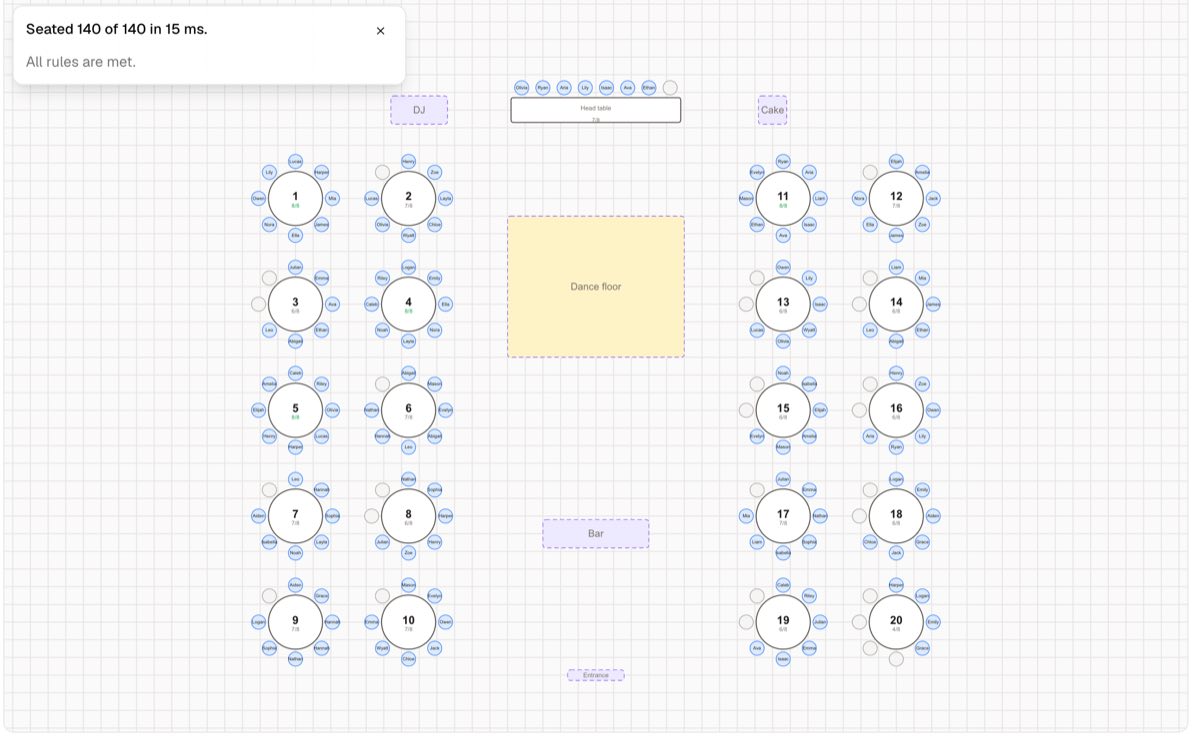
The seating chart shouldn't take three evenings
You know this:
- The guest list lives in a spreadsheet, the tables on sticky notes — and they never quite match.
- Every table hides a rule only you remember: the exes, the divorced parents, Grandma near the exit.
- One late RSVP and half the plan has to be redone — then the place cards reprinted.
You move names around for hours, second-guess every table, and still worry someone ends up next to the wrong person.
If you leave it like this
- The chart eats the evenings you meant for everything else.
- A last-minute change quietly breaks a table you'd already fixed.
- The poster at the door doesn't match the cards on the tables.
What changes when the chart seats itself
Every guest seated in about a second — with every rule you set respected.
Rules instead of memory
Write “sit together”, “keep apart” or “sit at table 1” once. Auto-seat follows them and tells you, in plain words, if one can't work.
Families stay together
Households are seated side by side and children next to their parents — automatically.
Late RSVPs are a non-event
Lock the tables you love, re-run auto-seat for everyone else, and reprint in a minute.
One list, every printout
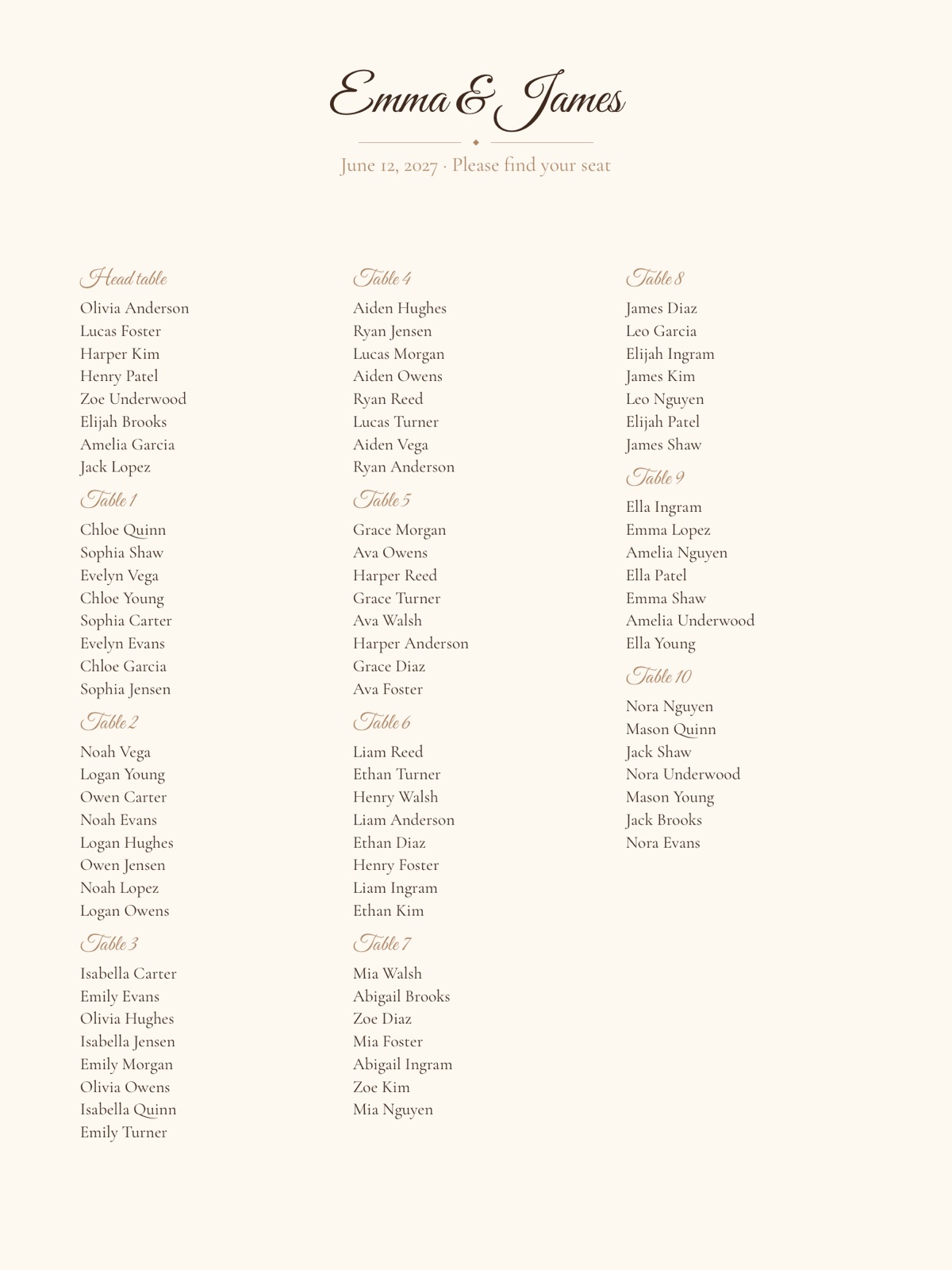
Poster, escort cards, place cards, table numbers and the caterer's list all come from the same plan, so they always match.
Guests find their own seat
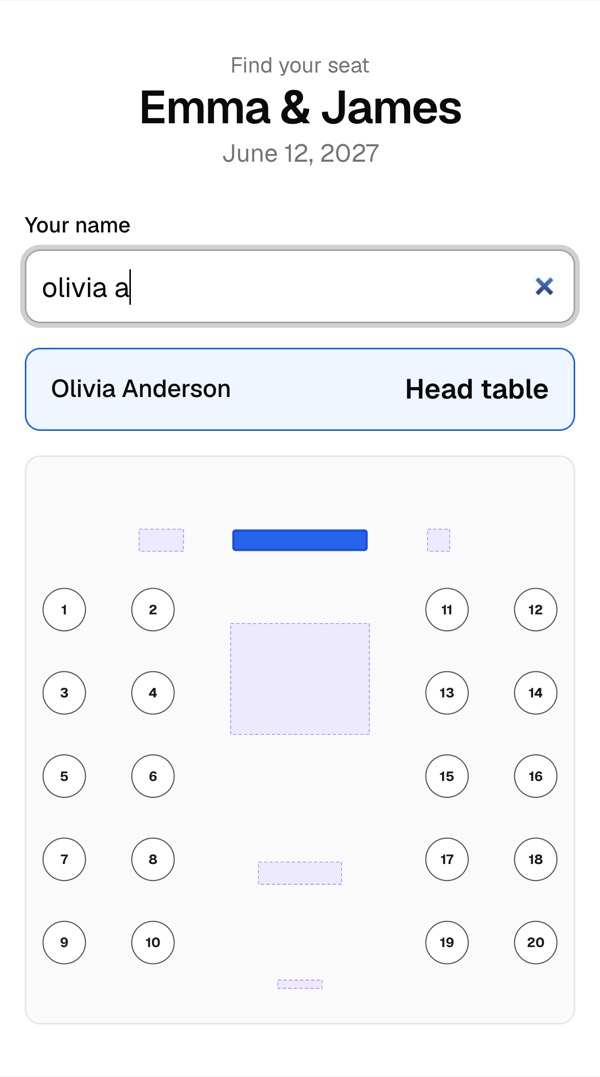
A QR code at the door opens a page where guests type their name and see their table on a map of the room.
Private by default
No account needed. Delete the chart with one click, and free charts are removed automatically after 30 days.
How it works
Four steps, all on one page.
- 01
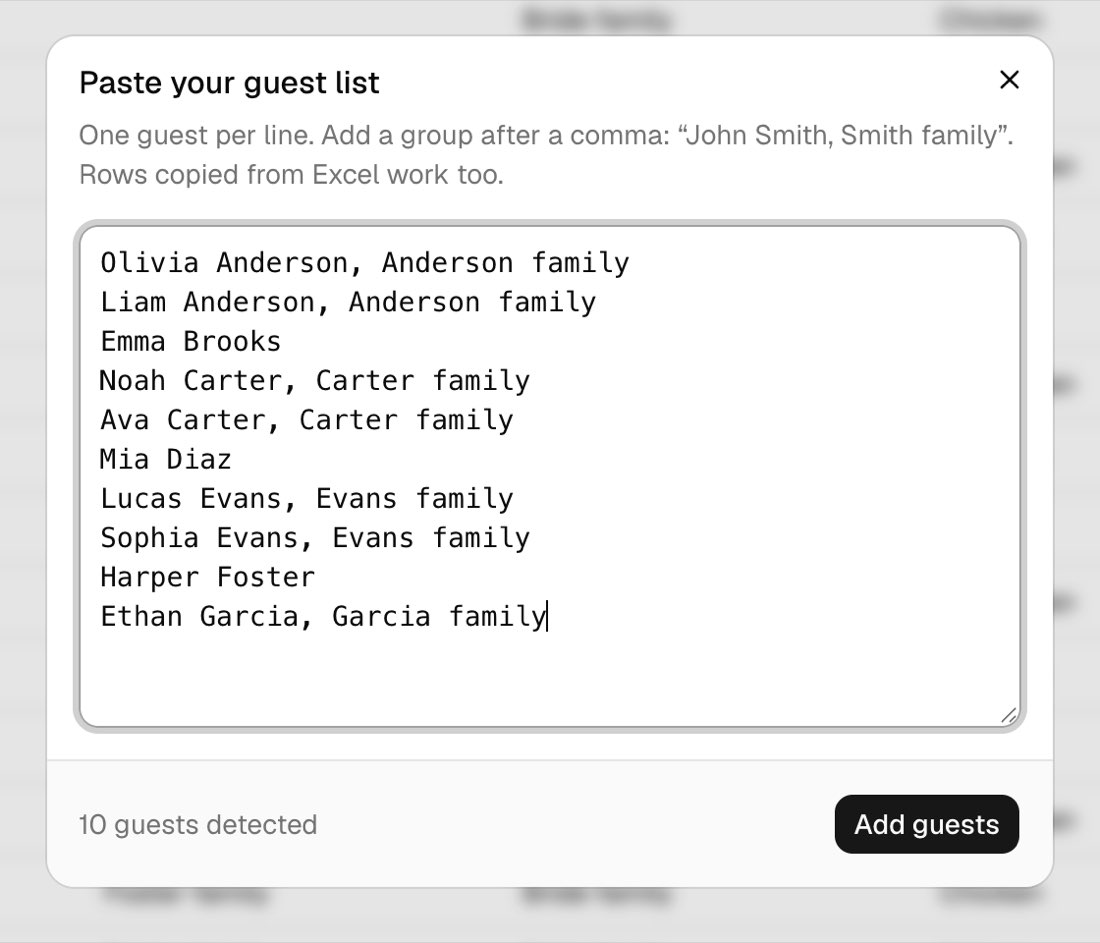
Add your guests
Paste names straight from Excel or Google Sheets, or upload the export from The Knot or Zola. Write a family name after a comma and that household stays together.
- 02
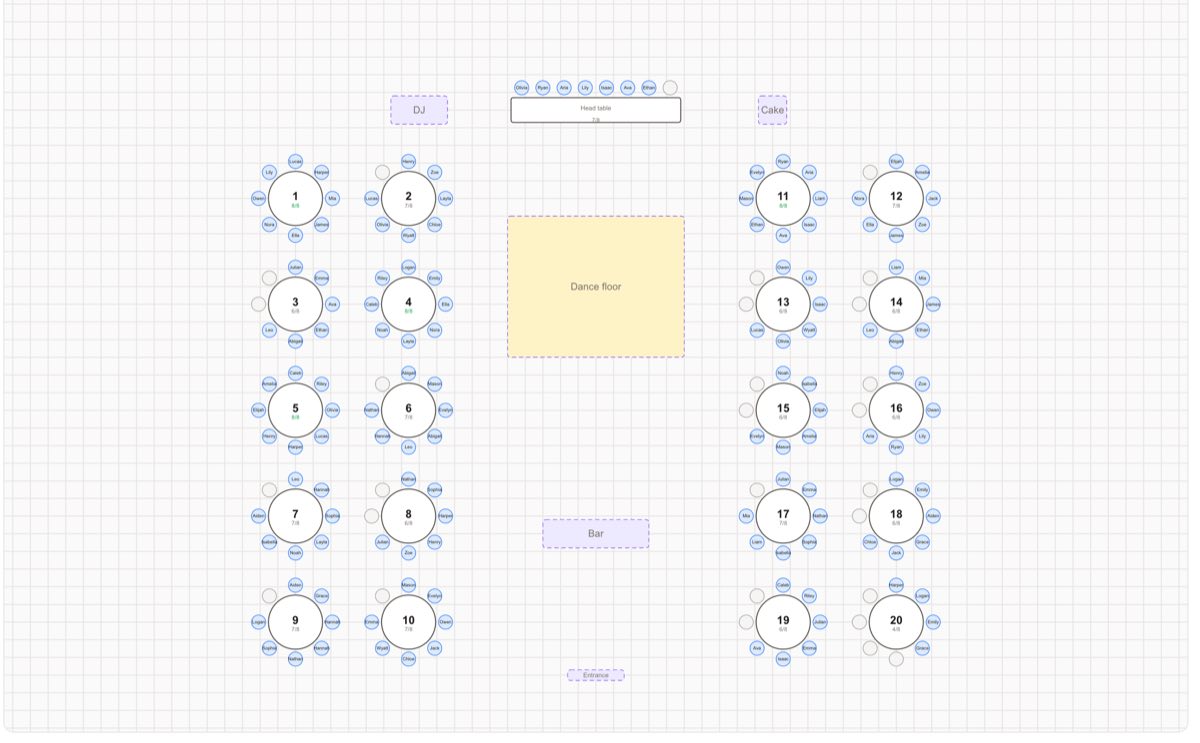
Draw your room
Start from a layout with a head table, round tables and a dance floor, or drag tables in yourself: round, rectangular, banquet or head table. Change the number of seats and the chairs move with the table.
- 03
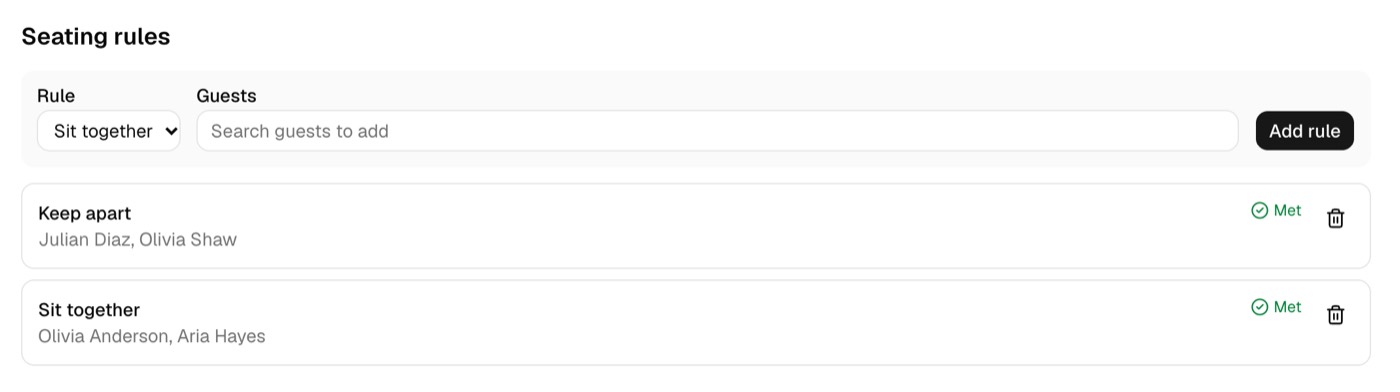
Add rules, press Auto-seat
Say who sits together, who must be apart and who belongs at a specific table. Auto-seat places everyone and balances the tables. Drag anyone to another chair, lock the seats you're happy with, run it again.
- 04
Print and share
Download a free seating chart poster at 18×24 or 24×36 inches. With the Event Pass, pick from six styles and print escort and place cards, table numbers and a “Find your seat” sign in the same style, and give guests a Find my seat page with a QR code.
Also included
- Catering list with meals (CSV), free
- Floor plan image (PNG), free
- Backup of your whole chart (JSON), free
- Lock guests and tables in place
- Undo, redo and autosave
- View-only link for your partner
- Works for parties, dinners and galas too
- Everyone seated in a second
- Your rules respected
- Every printout matches
Start free. Pay once for the full print set.
Plan, seat and print a basic poster for free. Get the Event Pass for premium styles, cards, table numbers and the guest page.
Free
$0
- Guest list import, room editor and templates
- Rules and auto-seat
- Seating chart poster PDF (basic style)
- Floor plan PNG, catering CSV, JSON backup
Event Pass
$19 one-time, per event
- 6 poster styles, no “Made with” line
- Escort cards, place cards and table numbers in one style
- “Find your seat” sign with QR code (8×10, 18×24 in)
- Find my seat link + QR code for guests
- Venue floor plan PDF
- Stored for 12 months after the event date
What are you planning?
Your chart opens right away — nothing to install, no account. Your guests stay private on your link.
Refund within 14 days on request.
Frequently asked questions
Is the seating chart maker really free?
Yes. Adding guests, building the room, setting rules, auto-seating and a basic seating chart poster PDF are free with no guest limit and no sign-up. You pay once per event only if you want premium styles, escort and place cards, table numbers, the “Find your seat” sign or the Find my seat page.
Do I need to create an account?
No. Your chart is saved automatically and opens from a private link on the device you used. Add your email later if you want to open it on another device.
Can I import my guest list from Excel, Google Sheets, The Knot or Zola?
Yes. Paste names straight from a spreadsheet, or upload a CSV or Excel file. Exports from The Knot and Zola are recognized automatically, and you can match any other columns by hand.
How does auto-seat decide who sits where?
It keeps households together, follows your rules (who sits together, who must be apart, who sits at a specific table) and fills tables evenly, preferring tables where guests share a group such as “College friends”. If a rule can't be met, it tells you which one and why.
What sizes can I print?
Posters at 18×24 and 24×36 inches, escort cards and folded place cards on Letter paper, table numbers in 4×6 or 5×7, a “Find your seat” sign at 8×10 or 18×24 and a floor plan on Letter or Tabloid. Every PDF is vector and prints at exact size.
Can I use it for a party or a corporate dinner?
Yes. Pick “A party or dinner” and you get round tables, a stage and a bar to start with. Guests, rules, auto-seat and every printout work the same as for a wedding.